A Secure, Maintainable Design for Enterprise Environments
As enterprise systems move toward containerization, a common set of requirements quickly emerges:
- Services are fully Dockerized
- Only one public entry point is exposed
- Apache is used as a Reverse Proxy
- All internal traffic is encrypted (HTTPS)
- Backend services use an Internal Certificate Authority (Internal CA)
This architecture is secure, scalable, and enterprise-friendly — but only if it is designed correctly.
Poor design choices often lead to serious problems such as:
- Certificate sprawl and private key exposure
- HTTPS without real certificate validation
- Internal CA treated like a public CA
- Excessive trust and unclear security boundaries
This article presents a production-ready reference architecture for Docker + Apache Reverse Proxy + Internal CA, focusing on long-term security and operability.
1. Architecture Goals
This design is built around four core principles:
- Expose Apache only
- Encrypt all internal traffic
- Use an Internal CA instead of public CAs
- Apply least trust and least exposure
2. High-Level Architecture
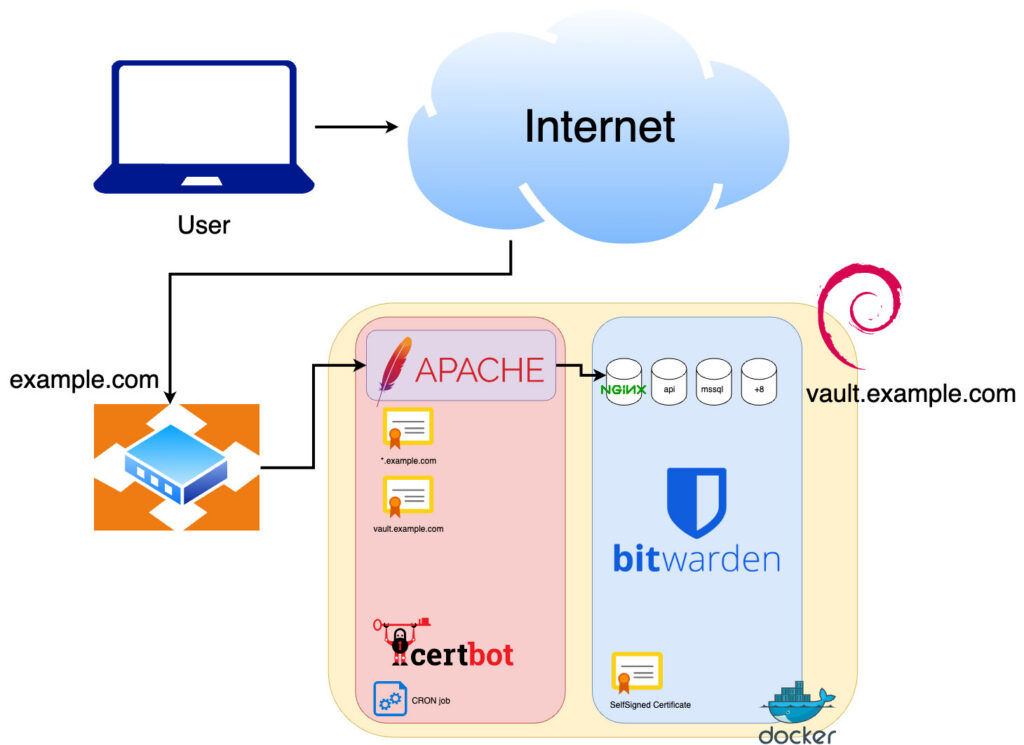
Internet / Users
│ HTTPS (Public Certificate)
▼
+————————–+
| Apache Reverse Proxy |
| (Docker Container) |
+————————–+
│ HTTPS (Internal CA)
▼
+————————–+
| Backend Services |
| (Docker Containers) |
+————————–+
Internal CA
(Offline Root + Intermediate)
3. Internal CA Prerequisites (Critical)
Recommended CA Hierarchy
Offline Root CA
   └─ Intermediate CA
        ├─ Apache Proxy Certificate
        ├─ Backend Service A Certificate
        └─ Backend Service B Certificate
Key Rules
- Root CA is always offline
- Docker containers must never contain CA private keys
- Only public CA certificates are distributed to containers
4. Apache Reverse Proxy Container Design
4.1 Apache’s Dual Role
In this architecture, Apache acts as:
- HTTPS Server (public-facing)
- HTTPS Client (connecting to backends)
👉 Apache becomes the central trust enforcement point.
4.2 Certificates Required in the Apache Container
| Certificate Type | Purpose |
|---|---|
| Public TLS cert | Browser-facing HTTPS |
| Internal CA cert | Validate backend services |
| ❌ CA private keys | Must never exist here |
4.3 Apache Reverse Proxy Configuration Example
SSLProxyEngine On

# Enforce strict backend certificate validation
SSLProxyVerify require
SSLProxyCheckPeerName on
SSLProxyCheckPeerExpire on

# Trust the Internal CA
SSLProxyCACertificateFile /etc/apache2/ssl/internal-ca.pem

ProxyPreserveHost On
ProxyPass        /api https://backend-api:8443/
ProxyPassReverse /api https://backend-api:8443/
📌 Important
backend-apiis the Docker service name- The backend certificate SAN must include
backend-api
5. Backend Service Container Design
5.1 Backend Responsibilities
Each backend service must:
- Serve HTTPS
- Use a server certificate issued by the Internal CA
- Protect its private key with strict file permissions
5.2 Recommended Certificate Files
| File | Description |
|---|---|
server.crt | Backend service certificate |
server.key | Private key (restricted access) |
ca-chain.pem | Intermediate + Root (if required) |
⚠️ Backend containers usually do not need to trust the Root CA unless mutual TLS (mTLS) is used.
6. Docker Network Design (Security Boundary)
Strong Recommendation: Use an Internal Network
docker network create internal_net
networks:
  internal_net:
    internal: true
Benefits
- Backend services are not reachable from outside
- Even misconfigured HTTPS services remain isolated
- Clear separation between public and private traffic
7. SNI and Docker Service Names (Commonly Overlooked)
When Apache connects to a backend using:
https://backend-api:8443
Apache sends:
SNI = backend-api
👉 Therefore, the backend certificate must include backend-api in its SAN.
Failure to align service names and certificates often results in:
- Certificate validation failures
- Wrong virtual host selection
- Hard-to-debug proxy errors
8. Internal CA Best Practices in Docker Environments
✅ Recommended
- Distribute CA public certificates only
- Manage CA operations outside Docker
- Automate certificate issuance and renewal via CI/CD or management hosts
❌ Avoid
- Embedding CA private keys in images
- Copying entire system trust stores into containers
- Reusing one certificate across multiple services
9. Common Mistakes and Their Impact
| Mistake | Consequence |
|---|---|
| Disabling backend TLS verification | Silent MITM attacks |
| Sharing certificates across services | One leak compromises all |
| Bringing Root CA online | Irrecoverable trust collapse |
| SAN mismatch | Proxy connection failures |
| No Docker network isolation | Accidental service exposure |
10. When Is This Architecture a Good Fit?
This design is ideal for:
- Enterprise internal systems
- ERP / EIP / API platforms
- Mail, LDAP, and internal web services
- Preparing for mTLS or Zero Trust adoption
Key Benefits
- Clear trust boundaries
- Long-term maintainability
- Controlled certificate lifecycle
- Containerization without sacrificing security
Conclusion: This Is Trust Engineering, Not Just Docker
Docker + Apache Reverse Proxy + Internal CA
is not merely about adding another HTTPS layer.
It is about building a controlled, auditable, and revocable trust model for enterprise systems.
When this foundation is solid, extending the architecture to:
- Mutual TLS (mTLS)
- Service mesh
- Zero Trust
- Hybrid cloud environments
becomes significantly easier and safer.