Turning “Encrypted HTTPS” into “Verified HTTPS”
After deploying an Internal CA / PKI, one of the most critical questions enterprises face is:
How do we configure Apache and Nginx to trust our Internal CA securely and correctly?
Many environments appear secure:
- HTTPS is enabled everywhere
- Certificates are issued by an internal CA
But under the hood, serious risks often remain:
- Reverse proxies do not actually verify backend certificates
- Internal CAs are over-trusted (entire system CA bundles)
- SAN / SNI mismatches lead teams to disable verification
- SSL verification is turned off “temporarily” — and never restored
This article provides a practical, production-ready guide to configuring Apache and Nginx to securely trust an Internal CA, without falling into common enterprise traps.
1. A Critical Concept to Understand First
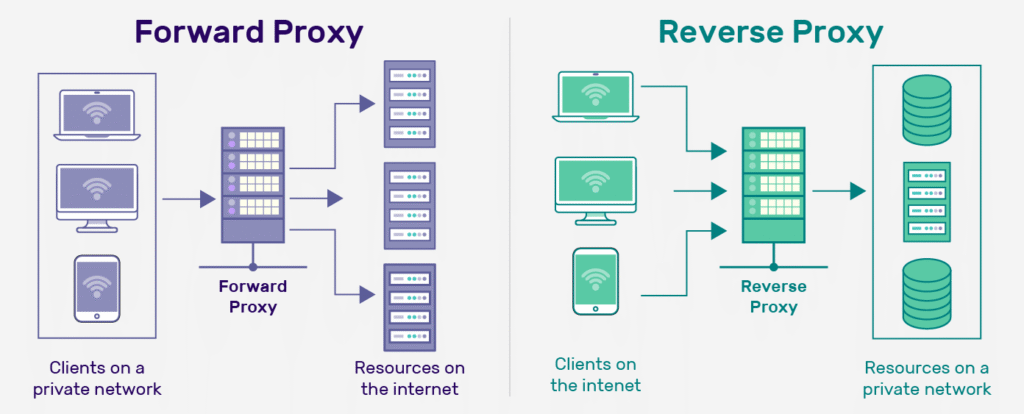
In a reverse proxy architecture:
Client ──HTTPS──> Proxy ──HTTPS──> Backend
- To the client, the proxy is a TLS server
- To the backend, the proxy is a TLS client
👉 Internal CA trust is most critical on the “Proxy → Backend” connection
If the proxy does not verify the backend certificate:
HTTPS provides encryption only — identity verification is lost
2. Typical Enterprise Architecture
User
│ HTTPS (Public Certificate)
▼
Apache / Nginx Reverse Proxy
│ HTTPS (Internal CA)
▼
Backend Services
Security depends not on whether HTTPS exists, but on:
Whether the proxy verifies the correct CA and the correct identity
3. Preparing Your Internal CA (Do This First)
Before touching Apache or Nginx, ensure the following:
✅ What You Should Have
- Internal Root CA certificate (public)
- Or Intermediate CA certificate (public)
❌ What Must Never Be Present
- Root or Intermediate private keys
- Full system CA bundles (unless intentionally required)
👉 A reverse proxy needs to trust a CA — not act as one
4. Apache: Securely Trusting an Internal CA (Hands-On)
4.1 Apache’s PKI Philosophy
Apache treats HTTPS proxying as a real TLS client operation:
If TLS is used, verification should be explicit and enforced
This makes Apache naturally suited for enterprise PKI environments.
4.2 Recommended Apache Configuration
SSLProxyEngine On

# Enforce backend certificate verification
SSLProxyVerify require
SSLProxyCheckPeerName on
SSLProxyCheckPeerExpire on

# Trust only the Internal CA
SSLProxyCACertificateFile /etc/apache2/ssl/internal-ca.pem

ProxyPreserveHost On
ProxyPass        /api https://backend-api.internal/
ProxyPassReverse /api https://backend-api.internal/
What Apache Verifies
- Certificate is issued by the Internal CA
- SAN includes
backend-api.internal - Certificate is not expired
👉 This is full PKI validation, not cosmetic HTTPS
4.3 Common Apache Mistakes
❌ Using IP addresses instead of hostnames (breaks SNI)
❌ SAN mismatch between certificate and ProxyPass target
❌ Trusting the entire system CA bundle unnecessarily
5. Nginx: Securely Trusting an Internal CA (Be Careful)
5.1 Critical Fact: Nginx Does Not Verify by Default
When proxying to an HTTPS backend:
Nginx encrypts traffic but does NOT verify certificates by default
In Internal PKI environments, this is a high-risk default state.
5.2 Mandatory Nginx Configuration (All Required)
proxy_ssl_verify on;
proxy_ssl_trusted_certificate /etc/nginx/internal-ca.pem;
proxy_ssl_server_name on;
Why Each Line Matters
proxy_ssl_verify on;
→ Enables certificate verificationproxy_ssl_trusted_certificate
→ Defines which CA is trustedproxy_ssl_server_name on;
→ Enables SNI to ensure correct certificate selection
Missing any one of these weakens security.
5.3 Common Nginx Pitfalls
❌ Setting a CA file but forgetting proxy_ssl_verify on
❌ Using IP addresses for backend connections
❌ Trusting too many CAs without understanding scope
👉 Nginx is powerful — but silently permissive
6. Apache vs Nginx: Internal CA Trust Comparison
| Aspect | Apache | Nginx |
|---|---|---|
| Backend cert verification default | Strict by design | Disabled by default |
| Internal CA configuration | Clear and explicit | Manual and error-prone |
| SAN / SNI enforcement | Explicit controls | Easy to forget |
| Misconfiguration risk | Low | High |
| PKI audit friendliness | High | Depends on team discipline |
7. Enterprise Best Practices Checklist
✅ Always Do
- Enforce certificate verification on proxy → backend
- Use hostnames, not IPs
- Minimize CA trust scope
- Keep SAN entries precise
❌ Never Do
- Disable SSL verification
- Trust all CAs blindly
- Use wildcard internal certificates
- “Temporarily” bypass PKI issues
8. Zero Trust Perspective (One-Line Conclusion)
Zero Trust requires:
Every connection must verify identity
If Apache or Nginx:
- Does not validate Internal CA certificates
- Merely forwards encrypted traffic
Then that connection does not meet Zero Trust requirements.
Conclusion: Trust Must Be Explicitly Designed
Configuring Apache and Nginx to securely trust an Internal CA is not about adding more TLS settings.
It is about answering one fundamental question:
Who do we trust — and how far does that trust extend?
When this is done correctly, your foundation for:
- Reverse proxy architectures
- Docker and Kubernetes
- mTLS
- Zero Trust adoption
becomes significantly stronger and easier to maintain.