From “It Connects” to “It Actually Verifies Identity”
When Apache is used as a Reverse Proxy in enterprise environments, many teams assume:
“HTTPS is enabled, backend services use certificates — so we must be secure.”
In reality, Apache’s TLS verification behavior when proxying to HTTPS backends is one of the most common places where enterprises think they are secure — but are not.
This article focuses on one critical question:
What does Apache actually verify when proxying HTTPS traffic,
and which settings are required for real TLS identity verification?
1. Apache’s Role in a Reverse Proxy Architecture
In a typical enterprise setup:
Client ── HTTPS ──> Apache Reverse Proxy ── HTTPS ──> Backend
Apache plays two TLS roles simultaneously:
- Toward the client: TLS Server
- Toward the backend: TLS Client
👉 All TLS verification discussed here refers exclusively to the “Apache → Backend” connection.
2. TLS Verification Flow in Apache Reverse Proxy
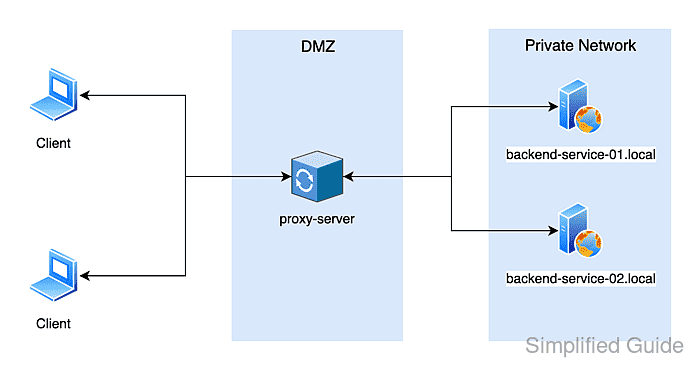
User
│ HTTPS (Public Certificate)
▼
Apache Reverse Proxy
│ HTTPS + TLS Verification
▼
Backend Service
The real security question is not:
“Is HTTPS enabled?”
But rather:
“Is Apache verifying the backend’s identity?”
3. Apache Modules Responsible for TLS Verification
TLS verification in Apache reverse proxying relies on:
mod_sslmod_proxymod_proxy_http
👉 All identity and trust decisions are enforced by mod_ssl.
4. Step One: Enabling TLS as a Client (SSLProxyEngine)
SSLProxyEngine On
What This Does
- Enables Apache to act as a TLS client when connecting to HTTPS backends
- Without it, Apache cannot establish HTTPS connections to backends
⚠️ Important clarification
SSLProxyEngine Onenables TLS — it does not enable verification.
Encryption alone is not authentication.
5. The Core of Verification: SSLProxyVerify
SSLProxyVerify require
Available Modes
| Value | Behavior |
|---|---|
none | ❌ No verification (dangerous) |
optional | ⚠️ Verify only if a certificate is presented |
require | ✅ Mandatory verification |
Why require Is Non-Negotiable in Enterprises
Without mandatory verification:
- Apache cannot confirm backend identity
- MITM attacks become invisible
- Zero Trust principles collapse
👉 Enterprise environments must always use require.
6. Verifying “Who” You Are Talking To: SSLProxyCheckPeerName
SSLProxyCheckPeerName on
What This Verifies
- The backend certificate’s CN / SAN
- Whether it matches the hostname Apache connects to
Practical Example
ProxyPass /api https://backend-api.internal/
The backend certificate must include:
DNS: backend-api.internal
❌ If you use an IP address instead:
ProxyPass /api https://10.0.0.5/
- SNI breaks
- Name verification fails
- Teams often disable verification “to fix it”
👉 This is one of the most common enterprise TLS design mistakes.
7. Verifying Certificate Validity: SSLProxyCheckPeerExpire
SSLProxyCheckPeerExpire on
Why This Matters
- Prevents the use of expired certificates
- Enforces proper certificate lifecycle management
- Required for audit and compliance readiness
This setting is often overlooked but critical in regulated environments.
8. Defining Trust: SSLProxyCACertificateFile
SSLProxyCACertificateFile /etc/apache2/ssl/internal-ca.pem
Correct Usage
- Contains CA certificates only (public keys)
- Typically:
- Intermediate CA
- Root CA (preferably limited in scope)
Common Mistakes
❌ Placing server certificates instead of CA certs
❌ Trusting the entire system CA bundle
❌ Using incomplete CA chains
👉 Apache should trust only the minimum required CA set.
9. SNI: The Silent Dependency of TLS Verification
Apache sends SNI (Server Name Indication) based on the backend hostname.
Correct
ProxyPass / https://backend-api.internal/
Incorrect
ProxyPass / https://10.0.0.5/
Consequences:
- Backend returns the wrong certificate
- Name verification fails
- Admins disable verification (worst possible fix)
10. A Complete and Correct Apache TLS Verification Example
SSLProxyEngine On

SSLProxyVerify require
SSLProxyCheckPeerName on
SSLProxyCheckPeerExpire on

SSLProxyCACertificateFile /etc/apache2/ssl/internal-ca.pem

ProxyPreserveHost On
ProxyPass        /api https://backend-api.internal/
ProxyPassReverse /api https://backend-api.internal/
👉 This is what “real TLS verification” looks like in Apache Reverse Proxy.
11. Common Misconfigurations and Their Impact
| Misconfiguration | Impact |
|---|---|
SSLProxyVerify none | MITM attacks go undetected |
| Using IP addresses | SNI and name verification fail |
| Trusting all CAs | Massive trust expansion |
| SAN mismatch | Connection failures |
| Ignoring expiration | Audit and security risks |
12. One-Line Zero Trust Summary
Zero Trust requires:
Every connection must verify identity
If Apache:
- Encrypts traffic
- But does not verify backend certificates
Then the connection:
Does not meet Zero Trust or enterprise security requirements
Conclusion: TLS Verification Is Not Optional — It Is a Responsibility
TLS verification in Apache Reverse Proxy is not an “advanced feature”.
It is a baseline security responsibility.
Secure HTTPS must include:
- ✔ Encryption
- ✔ Certificate validation
- ✔ Identity verification
- ✔ Minimal trust
If TLS verification breaks connectivity,
the problem is always in certificates or architecture — never in verification itself.