In enterprise environments, it is very common to see the following architecture:
- Apache provides HTTPS service to external users
- Apache acts as a Reverse Proxy
- The backend (upstream) service also uses HTTPS
- The backend certificate is issued by an internal CA or is self-signed
This raises an important and often misunderstood question:
👉 Does Apache trust a backend HTTPS service using a self-signed or internal CA certificate?
If not, what configuration is required?
The short answer is: Apache does not trust it by default, and proper configuration is essential for security.
1. A Key Concept You Must Understand
In this architecture, Apache plays two different roles:
- Browser → Apache
- Apache acts as an HTTPS Server
- Apache → Backend
- Apache acts as an HTTPS Client
That means:
Apache must validate the backend HTTPS certificate, just like a browser would.
By default, Apache only trusts public Certificate Authorities (e.g. Let’s Encrypt, DigiCert).
👉 Internal CAs and self-signed certificates are NOT trusted automatically.
2. Architecture Overview
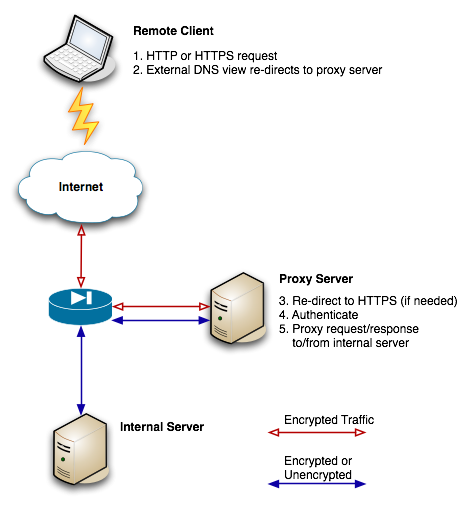
Browser
│ HTTPS (Public Certificate)
▼
Apache Reverse Proxy
│ HTTPS (Internal CA / Self-Signed Certificate)
▼
Backend Service
3. Recommended & Secure Approach (✅ Best Practice)
Trust the Internal CA and Keep Full Certificate Verification
This is the correct and production-ready solution.
3.1 Enable SSL Proxy Support
SSLProxyEngine On
Without this directive, Apache will not establish HTTPS connections to backend services.
3.2 Enforce Backend Certificate Validation (Strongly Recommended)
SSLProxyVerify require
SSLProxyCheckPeerName on
SSLProxyCheckPeerExpire on
This ensures Apache verifies:
- The certificate is signed by a trusted CA
- The certificate is not expired
- The hostname matches the certificate CN / SAN
3.3 Add Your Internal CA to Apache’s Trust Store
Assume your internal CA certificate is located at:
/etc/apache2/ssl/mycorp-root-ca.pem
Configure Apache to trust it:
SSLProxyCACertificateFile /etc/apache2/ssl/mycorp-root-ca.pem
📌 Important notes
- This file must contain the CA certificate, not the server certificate
- If you use intermediate CAs, include the full chain in the PEM file
3.4 Configure HTTPS Reverse Proxy
ProxyPreserveHost On

ProxyPass        /  https://backend.internal/
ProxyPassReverse /  https://backend.internal/
✔ The backend hostname must:
- Match the certificate SAN / CN
- Be a hostname, not an IP address (critical for SNI)
4. SNI: The Most Common Hidden Pitfall
If your backend:
- Hosts multiple HTTPS virtual hosts
- Shares the same IP address
Then SNI (Server Name Indication) is mandatory.
Key Rules
- Always use a hostname in
ProxyPass - Avoid
https://10.x.x.x/ - Apache 2.4+ with OpenSSL usually sends SNI automatically
Verify the Backend Certificate Manually
openssl s_client \
  -connect backend.internal:443 \
  -servername backend.internal \
  -showcerts
If you receive a default or unexpected certificate, SNI is not working correctly.
5. The “Quick but Unsafe” Method (❌ Not Recommended)
Disabling backend certificate verification entirely:
SSLProxyEngine On
SSLProxyVerify none
SSLProxyCheckPeerName off
SSLProxyCheckPeerExpire off
What does this mean?
- Apache will accept any certificate
- Man-in-the-middle attacks become invisible
- DNS poisoning or routing issues can silently redirect traffic
⚠️ Only acceptable for
- Short-term testing
- Isolated lab environments
- Never recommended for production
6. Common Errors and Their Causes
❌ unable to get local issuer certificate
➡ Apache does not trust the backend CA
✔ Fix: Add SSLProxyCACertificateFile
❌ Hostname verification failed
➡ Certificate SAN does not match the backend hostname
✔ Fix: Align DNS, certificate, and ProxyPass URL
❌ Wrong VirtualHost certificate returned
➡ SNI not sent correctly
✔ Fix: Use hostname instead of IP
7. Best-Practice Summary
| Scenario | Recommendation |
|---|---|
| Enterprise internal CA | ✅ Trust CA, keep verification |
| Production environment | ✅ Strict verification |
| Temporary testing | ⚠️ Disable verification briefly |
| Long-term operation | ❌ Never disable verification |
8. Conclusion
When Apache acts as an HTTPS reverse proxy, it is not merely forwarding traffic — it is a full HTTPS client.
If your backend uses an internal or self-signed certificate, you must:
- Explicitly trust the CA
- Enforce hostname and expiry checks
- Ensure SNI is functioning correctly
Once configured properly, this architecture becomes:
- Secure
- Predictable
- Easy to scale across multiple backends and services